API reference
--demo needs no account · 127.0.0.1 onlycraft serve starts a small HTTP server on your own machine and opens a page in your
browser. Sign in with Google, pick or create a GA4 property, copy the tag — everything
craft configure does, without a flag to remember.
Built the site with Lovable, v0 or Bolt? This is the shortest road from nothing to a measurement id in the clipboard, and what it hands you is written for the agent that built the app rather than for you to retype. The same pages run at anacraft.dev/app, with nothing to install — sign in there and copy the tag. This page is about running it yourself, and about the API behind it, which only the copy on your own machine serves.
The page is only the first caller. Every endpoint it uses is below, so a script, an editor extension or another service can register a tag the same way.
It is on Anacrafter Elite, the same plan craft
mcp is on — one subscription for the tag and for the assistant that reads the numbers
afterwards. The command starts for anybody: the page is where somebody signs in and, if they need
to, subscribes, and a server that refused to start would leave them nowhere to do either.
01Start it on your machine
craft serve

  anacraft serving on http://127.0.0.1:52413
  token  Jc8Kq2vXn0pLd4WbT7yS1rEo9ZmHfA6uG3iN5xQa
  opened your browser — ctrl-c to stop
| Flag | Default | What it does |
|---|---|---|
| --port <n> | an ephemeral port | Pin the port. Useful when something else has the URL written down. |
| --no-open | opens | Print the URL instead of opening a browser. |
| --token <t> | 40 random characters | Supply the token yourself, for a script that needs to know it in advance. |
| --idle <mins> | 60 | Stop after this long with no request. 0 runs until Ctrl-C. |
| --demo | off | Synthetic everything, and no account needed. The reports answer with the dashboard's demo numbers; the writes answer with a synthetic measurement id and create nothing. |
02The page it opens
Three screens, and you are done with the second one:
craft login shows, because
it is the same OAuth client and the same two Analytics scopes.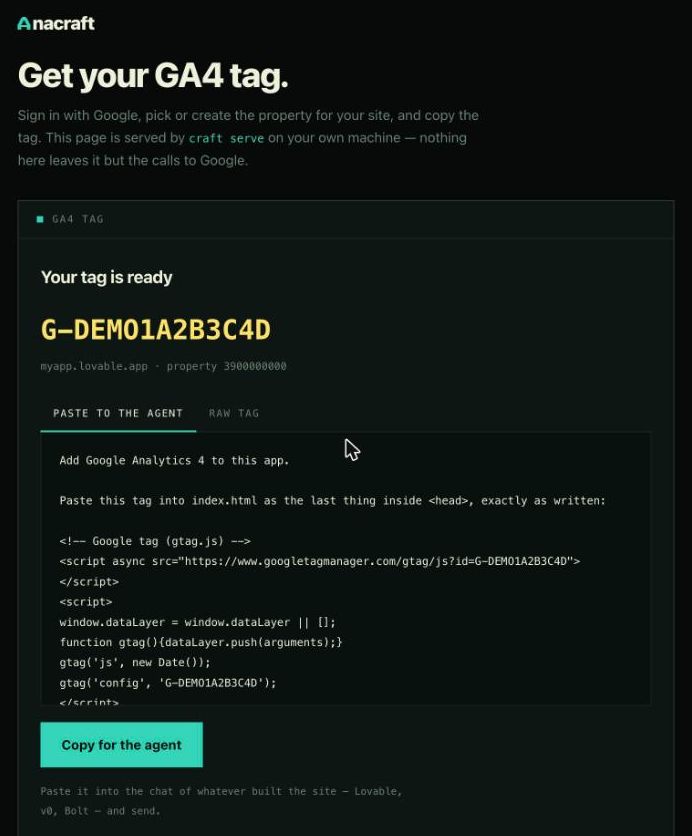
The page is handed the run token in the URL it is opened with; the credentials stay with the CLI, which had them already. Signing in from it sends the Google tab straight back to your properties rather than leaving it on a sentence about returning to a terminal nobody was in — the last step of a sign-in is not a thing to make somebody click through.
It wears the palette the dashboard is set to, and the swatches in its footer change it — for the
page and for craft dash both, because picking one writes the same line
craft theme writes. It keeps no preference of its own on purpose: everything worth
remembering is already in the config the terminal reads.
03Talking to it yourself
JSON in, JSON out, one version prefix. Every endpoint but /v1/health and
/v1/openapi.json wants the bearer token the server printed when it started — the same
one it printed last time, since it is derived rather than minted. In a header, or as
?token= on the URL for anything that cannot send one:
curl -s http://127.0.0.1:52413/v1/session \
  -H 'Authorization: Bearer Jc8Kq2vXn0pLd4WbT7yS1rEo9ZmHfA6uG3iN5xQa'
Locally the token also arrives in the URL the browser is opened with, as #k=…. It is in
the fragment rather than the query so it is never sent to the server as part of a request line and
never lands in a log. The pages are rendered a route at a time and a form cannot send a header, so
the browser hands the fragment over once and carries the token in a cookie afterwards — set
HttpOnly, so no script can read it back, and SameSite=Strict, so no other
origin's form can spend it. The address bar is cleared either way.
Browsers get no help reaching it from anywhere else: it answers CORS preflights for its own
loopback origin and nothing besides. There is no wildcard and no flag that makes one — a page on the
public web can absolutely try to talk to 127.0.0.1, it just cannot guess forty random
characters while doing it.
04The endpoints
| Endpoint | Does | Needs |
|---|---|---|
| GET /v1/health | Liveness, and the version that answers. | nothing |
| GET /v1/openapi.json | This table, as OpenAPI 3.1, with the port it is really on. | nothing |
| GET /docs | The same document with the punctuation put in — a reference page, on the server. | nothing |
| GET /v1/session | Who is signed in, on what plan, with which default property. | token |
| POST /v1/session | Start the Google sign-in; it opens a browser and answers at once. | token |
| DELETE /v1/session | Revoke the credentials and forget them. | token |
| GET /v1/subscription | Plan, status, and the date it started. | account |
| POST /v1/subscription/checkout | A Stripe checkout URL, already tied to this account. | account |
| GET /v1/properties | Every GA4 property this login can see. | account |
| POST /v1/properties | Create a property and its web stream. Returns the tag. | plan |
| DELETE /v1/properties/{id} | Move a property to the Analytics trash. Wants the id twice. | account |
| GET /v1/properties/{id}/streams | The web data streams on a property, with their ids. | account |
| POST /v1/properties/{id}/streams | Add a web stream to a property that has none. Returns the tag. | plan |
| PUT /v1/property | Set the default property, the way craft use does. | account |
| GET /v1/themes | The palettes the dashboard ships, and which one is in force. | token |
| PUT /v1/themes | Wear one, the way craft theme does. | token |
| GET /v1/tag/{measurement_id} | The snippet and the paste-ready prompt for an id you already have. | token |
| GET /v1/overview | Users, sessions, views, key events, bounce, duration, with deltas. | account |
| GET /v1/pages | Most-visited pages. | account |
| GET /v1/events | Events by count, against the previous period. | account |
| GET /v1/sources | Source / medium pairs by sessions. | account |
| GET /v1/referrers | Referring pages by sessions. | account |
| GET /v1/countries | Users by country. | account |
| GET /v1/live | Who is on the site right now, by country. | account |
| GET /v1/audit | What is wrong with how the property measures. Reads only. | plan |
token means the bearer token and nothing else. account and plan both mean a
Google account signed in with an Elite subscription on it: everything that reaches a real Analytics
account goes through one door, and an account short of the plan gets a
402 carrying a checkout URL rather than a flat refusal. --demo
needs neither.
The reference, on the server
A running craft serve hosts its own reference at /docs: every route
grouped by what it is for, the method, what it needs, and a curl line per endpoint with
the token already in it, which copies on a click. It needs no token of its own, and it is drawn from
the document below rather than written out a second time, so it cannot describe a route that is not
there.
craft serve → http://127.0.0.1:52413
                       http://127.0.0.1:52413/docs
Swagger UI, Redoc and Scalar all render an OpenAPI document better than this does, and all three are a megabyte of JavaScript from a CDN — a page that stops working on a plane, and a megabyte of binary for nineteen routes. If you would rather have one of them, the document is right here:
Or let a machine read it
Everything in the table above is also served as an OpenAPI 3.1 document, so a generated client, an editor, or an agent that speaks OpenAPI can pick the API up without being told about it twice.
curl -s http://127.0.0.1:52413/v1/openapi.json | jq .paths
It needs no token, which is the second of the two open routes. A description of the door is not a key to it — every word of it is on this page already — and a client generator reads the description before it has been given a token, which is the whole point of having one.
It is built when you ask for it rather than written down, for one field: servers
carries the port this run actually got, and a document naming yesterday's port would send every
generated client to a closed door. The descriptions come from a table in the source that a test
checks against the router, so a route cannot be added without the document growing a line for it.
05Signing in
The server owns the flow, because it owns the credentials. POST /v1/session opens the
same browser window craft login does and returns immediately — a sign-in takes as long as
a person takes — so the page polls until the answer changes.
POST /v1/session
→ 202  { "state": "pending" }

GET /v1/session
→ 200  { "signed_in": false, "state": "pending" }
→ 200  { "signed_in": true,
         "state": "signed_in",
         "email": "[email protected]",
         "account_id": "1080…",
         "subscribed": true,
         "tier": "pro",
         "demo": false,
         "property": { "id": "397412345", "name": "My app" },
         "version": "0.25.0" }
state is one of idle, pending, signed_in or
failed; a failed one carries the reason in error, so a page
polling this can say what went wrong rather than spinning. tier and
subscribed are asked of the subscription service on every call, which is how a payment
made on another machine thirty seconds ago is already true here.
06Registering a tag
The whole point, in one call. It creates the property, adds the web data stream, reads the measurement id back, and returns the two blocks of text somebody actually needs.
POST /v1/properties
{ "url": "https://myapp.lovable.app",
  "name": "My app",            // optional, defaults to the host
  "account": "accounts/12345"  // optional when the login has one
}

→ 200  { "property": { "id": "397890123", "name": "My app" },
         "host": "myapp.lovable.app",
         "action": "created",     // or "reused", or "finished"
         "measurement_id": "G-1A2BCD345E",
         "default_uri": "https://myapp.lovable.app",
         "tag": "<!-- Google tag (gtag.js) -->\n<script async …",
         "prompt": "Add Google Analytics 4 to this app.\n\nPaste this tag …" }
action is the honest part. A site that already has a property gets
reused and nothing is created — running this twice is the normal way to get a tag back,
and a second property for the same site would split its numbers in two with nothing to say so until a
week had gone to the wrong one. finished means the property was there and its web stream
was not.
tag is the gtag.js snippet with the id in both of the places it belongs — the single
commonest broken install is an id pasted into the src and left as a placeholder in the
config call. prompt wraps it in instructions for an agent, and rules out the
three ways one usually improves on it: an npm wrapper, a second tag, and a hand-rolled page view on
route changes that counts every navigation twice.
A property that already exists takes the second half on its own:
GET  /v1/properties/397890123/streams
→ 200  { "streams": [ { "measurement_id": "G-1A2BCD345E",
                       "url": "https://myapp.lovable.app",
                       "name": "myapp.lovable.app" } ] }

POST /v1/properties/397890123/streams
{ "url": "https://myapp.lovable.app" }
→ 201  { "measurement_id": "G-…", "tag": "…", "prompt": "…" }
These two writes are the only ones in the API, and they are the two
the scope submission describes:
properties.create and dataStreams.create. Nothing here updates or deletes
anything in an Analytics account — craft delete stays a command somebody has to type.
Throwing one away
The other half of being able to make a property: an app rebuilt three times leaves three of them behind, and the Analytics console is four screens away.
DELETE /v1/properties/397890123?confirm=397890123
→ 200  { "property": "397890123",
         "state": "trashed",
         "forgotten": true,
         "restorable_days": 35 }
The id goes in twice — once in the path and once in confirm — so a request built wrong
by a script has to be wrong the same way twice. It is the same opt-in-twice the CLI asks for, where
the command needs a subcommand and then a flag.
Google's delete is a soft one, which is what makes this defensible: the property goes to the
account's trash and sits there for 35 days, fully restorable from the console, before anything
is actually gone. The undo is Google's, it is where a person would look for it, and nothing here can
shorten it. forgotten says whether this machine was also opening on that property and has
stopped.
07Reading the numbers
The read endpoints take the same two parameters and answer the same shape.
| Parameter | Default | Notes |
|---|---|---|
| property | the saved default | Any property the login can read, by id. |
| days | 7 | 1 to 365, clamped. Ignored by /v1/live, which is now. |
| limit | 10 | Rows, where there are rows. 1 to 100, clamped. |
| q | — | Substring filter on /v1/pages and /v1/events. |
GET /v1/pages?property=397890123&days=7&limit=3
→ 200  { "property": "397890123",
         "window": { "from": "2026-09-12", "to": "2026-09-18" },
         "rows": [ { "page": "/", "views": 6714 },
                   { "page": "/pricing", "views": 3917 },
                   { "page": "/blog", "views": 2136 } ] }
Every answer carries the property and the window it covers, so a caller quoting a number can say what it is a number of. Identical reports are cached for a minute, which is what keeps a chatty caller from spending the API quota the dashboard needs.
08When it says no
{ "error": { "code": "payment_required",
             "message": "Creating a property needs the Anacrafter plan.",
             "checkout_url": "https://buy.stripe.com/…" } }
| Status | Code | Means |
|---|---|---|
| 400 | bad_request | A parameter is missing or not the shape it has to be. |
| 401 | unauthorized | No bearer token, or not one this server trusts. |
| 402 | payment_required | The account is not on Elite. checkout_url is where to
fix that, already tied to the signed-in account. |
| 403 | forbidden | Google refused: the account lacks Viewer on the property, or Editor on the account. |
| 404 | not_found | No such property, stream, or route. |
| 409 | not_signed_in | Nothing is signed in — POST /v1/session starts one. |
| 409 | not_supported | A write while --demo is in force, which by design changes
nothing anywhere. |
| 429 | rate_limited | Google is throttling, or this server is. Retry-After says how long. |
| 500 | no_client | This build has no OAuth client compiled in, so there is nothing to sign in
with. A release binary has one; a cargo build of your own needs
its own. |
| 502 | Google answered something unexpected; its message is passed through whole. |
09What it will not do
- Bind anything but loopback. There is no flag that widens it, because there is no version of this that belongs on a network you do not control.
- Answer without a token. Two endpoints are open: a version string, and a description of the API that is published on this page anyway.
- Trust an origin it was not told about. No wildcard CORS, in either posture.
- Write anything to an Analytics account beyond the two creates and the one delete above. No updates, no key events, no settings — those live behind commands a person runs. And the delete is Google's soft one, asked for twice.
- Outlive its usefulness. It stops after an hour with nothing to do: a server started to hand over one tag should not still be listening the next morning.
10Questions
Why a server, when there is already a CLI?
Because registering a tag is the one thing people do before they have any reason to trust a terminal. A page with three screens gets somebody from nothing to a measurement id in the clipboard, and the endpoints underneath mean the second caller does not have to be a person.
Can I run it for other people?
Not today. It is one machine's API, holding one account's credentials, and it binds loopback with no way to say otherwise. A posture that takes each caller's own Google token and keeps nothing — the shape a hosted version would have to have — is a thing to build deliberately, not a flag to leave lying around.
Does it work without a Google account?
craft serve --demo answers everything synthetically: the reports carry the
dashboard's demo numbers, the property list has one demo property in it, and registering a tag hands
back G-DEMO1A2B3C4D having created nothing. The whole page can be walked that way, which
is how it is tested. The two calls that would change something on this machine — saving a default
property, starting a checkout — refuse by name rather than pretending, because a demo that quietly
wrote into a real Analytics account because credentials happened to be on the disk is the worst
surprise this could hold.