Lovable × Google Analytics × MCP

Your Lovable app needs a dashboard.

Lovable builds your app. anacraft gives you the numbers — who is visiting, what they look at, where they come from. Add GA4 to your Lovable project in one prompt, then ask your AI assistant anything. The data is real, the answers are instant, and you never leave the conversation.

See the setup ↓
The problem

Lovable builds apps. But who is using them?

You described an app, Lovable built it, and it is live. Now you need to know if anyone showed up. The GA4 console works, but it is a different tab, a different login, and a different language from where you are already working.

Lovable
builds the app
+plus
anacraft
reads the analytics
=equals
Full picture
build + insights, one workflow
Setup

Two prompts, one install.

anacraft is a CLI that runs on your machine. It reads your GA4 data and serves it to any MCP-compatible AI client — Claude, ChatGPT, Cursor, VS Code. One install, one sign-in, and your assistant has the numbers.

01

Add analytics to your Lovable app

Open your Lovable project and tell the agent:

// in the Lovable chat Add Google Analytics to this project

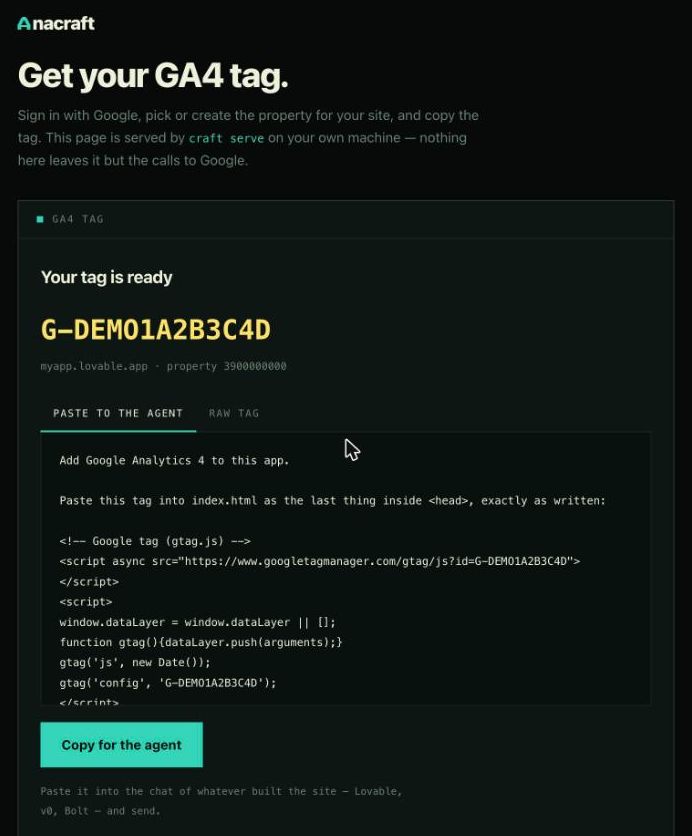
Lovable will create a GA4 property and add the gtag snippet. You get a G-XXXXXXX measurement ID back. If you prefer to do it yourself, ask Lovable for the index.html and paste the tag into <head>.

Already have GA4 on your Lovable app?

Skip to step 2. If you set up analytics through the Google Analytics console instead of Lovable, you already have what you need.

02

Install anacraft

One command downloads the binary. macOS, Linux, Windows.

curl -fsSL https://anacraft.dev/install.sh | bash

This gives you the craft command. It is a single binary with no dependencies — uninstall by deleting it.

03

Sign in and connect your property

Sign in with your Google account, then point anacraft at the GA4 property Lovable created.

# sign in to Google (once, opens browser) craft login # if Lovable created the property, find its ID craft props # or let anacraft create one for your domain craft configure yoursite.com

craft props lists every GA4 property your account can see. Pick the one Lovable made and set it as default with craft use <id>.

04

Add the MCP server to your AI client

anacraft speaks MCP over stdio — your client spawns it as a child process. No port, no server to run, no config file to babysit. The easiest way:

# writes directly into Claude Desktop's config craft mcp --install

Or add it manually to your client's MCP config:

Claude Code

claude mcp add anacraft craft mcp

Claude Desktop (or run craft mcp --install)

// ~/Library/Application Support/Claude/claude_desktop_config.json { "mcpServers": { "anacraft": { "command": "/absolute/path/to/craft", "args": ["mcp"] } } }

Cursor / Windsurf

// ~/.cursor/mcp.json { "mcpServers": { "anacraft": { "command": "craft", "args": ["mcp"] } } }

Restart the client after saving. The tools appear in your assistant's tool list automatically.

No subscription yet?

craft mcp --demo serves synthetic data — no Google account, no subscription. It is the fastest way to see the tools work. Live data requires an Elite plan ($9.99/mo).

05

Ask your assistant

Open Claude, ChatGPT, or Cursor and ask about your site. The assistant reads live GA4 data and answers with real numbers.

you: how is the site doing this week? assistant: [calls site_status — reads GA4] assistant: 12,481 users this week, up 9% from last week. Sessions grew 7% to 18,203. Bounce rate improved to 41.2%. you: what pages are people looking at? assistant: [calls list_pages] assistant: Top pages: / (6,714), /pricing (3,917), /docs/quickstart (2,765), /blog (2,136). you: is anyone on the site right now? assistant: [calls live_visitors] assistant: 124 active users. US: 46, India: 16, Germany: 11.
Tools

Every question, answered.

anacraft exposes these tools to your AI client. All are read-only. All carry the date window they cover. All work with the property you configured.

📈

Site status

Users, sessions, page views, key events, bounce rate, and session duration — with deltas and a daily trend. The "how are we doing" call.

🟢

Live visitors

Who is on the site right now, by country. Realtime, polled every 10 seconds.

📄

Top pages

Most-visited pages ranked by views.

🎯

Top events

Events ranked by count, with the previous period for comparison.

🔗

Traffic sources

Source / medium pairs ranked by sessions.

🌍

Countries

Users by country, ranked.

🔍

Search

Filter pages or events by a substring — "/blog", "purchase", "signup".

⚙️

Properties

Switch between GA4 properties without leaving the conversation.

Multiple projects

More than one Lovable app?

Each Lovable project gets its own GA4 property. anacraft reads all of them — switch between properties by name or ID without restarting anything.

you: switch to the booking app assistant: [calls list_properties] assistant: Found: "My SaaS" (397412345), "Booking App" (397890123), "Portfolio" (397654321). Switching to Booking App. you: how is it doing? assistant: [calls site_status — reads the booking app's GA4]
Bonus

Also a terminal dashboard.

anacraft is not just an MCP server. Run craft dash in any terminal for a full-screen, live-updating dashboard with ore-textured bars, sparklines, and achievement toasts when the numbers move.

craft dash # live dashboard for the default property craft dash --demo # synthetic data, no account needed craft overview --format json # one-shot, scriptable

Start mining your metrics.

Install anacraft, connect your Lovable app's GA4 property, and ask your assistant anything about your traffic.